
The goal of osrm.backend is to be a companion to osrm R package https://github.com/riatelab/osrm:
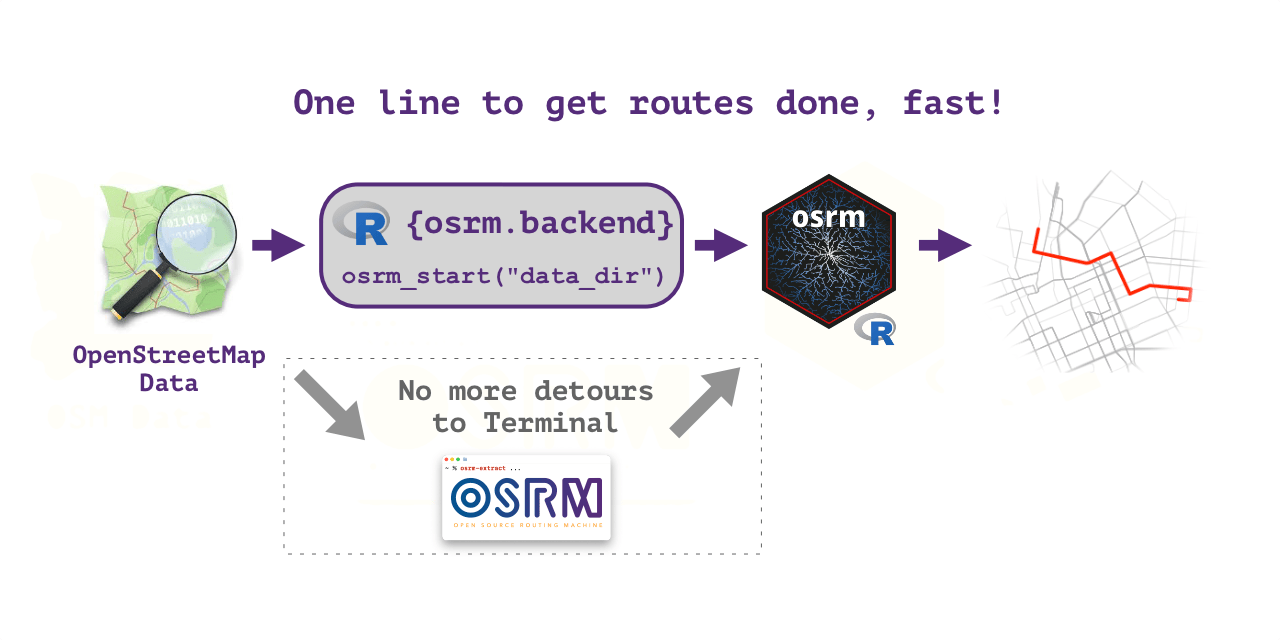
provide single line quick start with
osrm_start()function that does everything automatically to run local OSRM backend server, no other setup is required;easily install
osrm.backendon major operating systems (Linux, Windows, MacOS);provide wrapper functions to prepare data for
osrmrouting;provide wrapper to start/stop local OSRM backend server.
OSRM backend binaries
By default, osrm.backend installs OSRM from e-kotov/osrm-binaries. These are immutable OSRM backend binary releases built from upstream OSRM source tags primarily for this R package.
The default binary releases are different from the official upstream OSRM release assets:
- they contain backend command-line executables such as
osrm-extract,osrm-contract,osrm-customize,osrm-partition, andosrm-routed; - they do not include upstream
node_osrmNode.js package artifacts; - they use predictable archive names for Linux, macOS, and Windows;
- they bundle runtime libraries where practical, so the archives are more portable for R users than relying on a local OSRM build toolchain;
- they are live-tested by this package on Linux, Linux arm64, macOS, and Windows.
The official upstream binaries from Project-OSRM/osrm-backend are still available with:
osrm_install(osrm_binaries_provider = "official")That provider is kept as a compatibility option. The main supported and tested installation path is the default e-kotov/osrm-binaries provider. See the OSRM binary providers vignette for details.
Installation
Install the latest stable release of osrm.backend from CRAN with:
install.packages("osrm.backend")You can install the development version of osrm.backend from R Universe with:
install.packages('osrm.backend',
 repos = c('https://e-kotov.r-universe.dev', 'https://cloud.r-project.org')
)
or from GitHub repo with:
# install.packages("pak")
pak::pak("e-kotov/osrm.backend")
You can prepare the OpenStreetMap data for routing with one function osrm_start(<path_to_osm_file_or_folder_with_osm_file>), set the osrm.server option to http://localhost:5001/ and use all the osrm functions as usual. You do not need to have osrm-backend installed or have Docker to run osrm-backend from a container, everything is handled automatically on all major operating systems. Just follow the Get started guide. For advanced control over each step of the process, see the full function reference.
OSRM Graphical User Interface demo
Auto-tested OSRM releases (generated)
| OS | Badge | Validated releases | Notes |
|---|---|---|---|
| LINUX |

|
v26.9.0, v26.8.0, v26.7.3, v26.7.2, v26.7.1, v26.7.0, v26.6.5, v26.6.4, v26.6.3, v26.6.2, v26.6.1, v26.6.0, v26.5.0, v26.4.1, v26.4.0, v6.0.0, v5.27.1
|
v5.27.1 - v26.9.0 |
| MACOS |

|
v26.9.0, v26.8.0, v26.7.3, v26.7.2, v26.7.1, v26.7.0, v26.6.5, v26.6.4, v26.6.3, v26.6.2, v26.6.1, v26.6.0, v26.5.0, v26.4.1, v26.4.0, v6.0.0, v5.27.1
|
v5.27.1 - v26.9.0 |
| WINDOWS |

|
v26.9.0, v26.8.0, v26.7.3, v26.7.2, v26.7.1, v26.7.0, v26.6.5, v26.6.4, v26.6.3, v26.6.2, v26.6.1, v26.6.0, v26.5.0, v26.4.1, v26.4.0, v6.0.0, v5.27.1
|
v5.27.1 - v26.9.0 |
Badge source: badges branch — raw JSON files (e.g. osrm_versions_ubuntu.json).