Cache Hit plugin for Herdr
Keep the warm context warm.
cache-hit gives Herdr a real-time view of prompt-cache health: hit ratios, retained tokens, expiration countdowns, and deadline-aware agent sorting.

Works locally with Codex CLI, Claude Code, OpenCode, and Antigravity CLI on macOS, Linux, and Windows through Git Bash.
Latest: v0.1.25 · October 10, 2026
Codex cache clocks now follow the current transcript after prompt rewind/edit. Recent updates also add native Windows support through Git Bash and fix automatic background refreshes. See the changelog.
Features
One compact sidebar answers the question that matters before you switch agents: which context is still reusable, and which one needs attention now?
Alarm icon shows when cache is about to expire
When a cache is about to expire, the custom expiry sort view pushes its agent to the top. A configurable alarm icon appears, and the countdown becomes bolder.
Active caches show remaining time and retained tokens
Active agents show time to expiry, cache-hit percentage when available, and retained read tokens. The same indicators work across Antigravity CLI, Codex, and Claude.
Cold caches keep token history, not stale percentages
After expiry, the percentage disappears. The ❄ ⇣tokens state keeps retained-token history without implying that the cache is reusable.
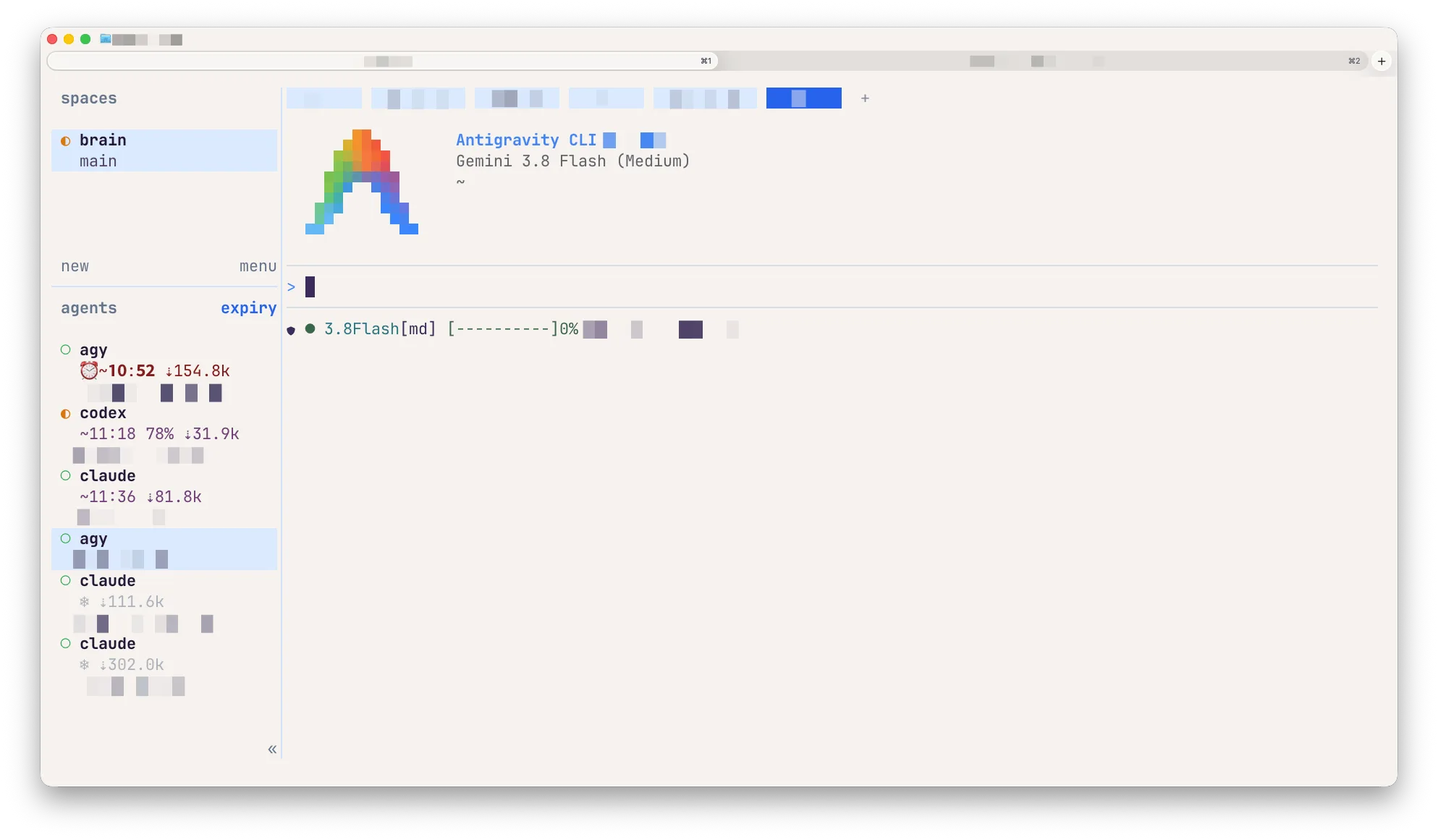
Alarm icon shows when cache is about to expire
The expiry sort view pushes the agent to the top. A configurable alarm icon appears, and the countdown becomes bolder.
Active caches show remaining time and retained tokens
Active agents show time to expiry, cache-hit percentage when available, and retained read tokens.
Cold caches keep token history, not stale percentages
After expiry, the percentage disappears. The ❄ ⇣tokens state keeps retained-token history without implying that the cache is reusable.
See active cache metrics
See time to expiry, cache-hit percentage when available, and retained read tokens. The values update while the cache is active.
Expired caches show as cold
When a cache expires, its percentage disappears. A snowflake and the retained-token count remain.
Put expiring caches first
Press prefix+s to put the cache closest to expiry at the top of the agents pane. Press it again to return to the default view.
Compatibility: macOS and Linux; native Windows Herdr through Git Bash, with WSL2 also supported. jq and Bash are required. Python 3.6+ is recommended for exact Codex transcript selection and needed for OpenCode, sorting, or session recovery without a native session ID. Go is needed only to build the optional Antigravity CLI helper from source.
Install
$ herdr plugin install e-kotov/herdr-cache-hit